

Prom Edition Send Off Invitation


Prom Edition Send Off Invitation
Opens the full template in your browser — no account needed.

About this printable
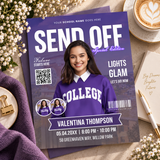
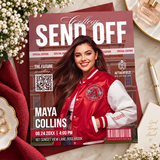
A send-off invitation in magazine cover style, in blue and white over a campus background, with a black name bar across the lower third and a prompt at the top reading "your school name goes here". The masthead pairs COLLEGE SEND OFF with a LEVEL UP: PROM EDITION panel, so the same card covers a prom send-off, a college send-off or a graduation party depending on which words you keep. Every element is editable - the photo, the campus background, the blue wash, the masthead, the class year, the QR panel and the barcode. Full US Letter page at 8.5 x 11 inches.
What you get
- One printable page, 8.5 x 11 inches (US Letter)
- One editable Canva template, opened from a link in your instruction PDF
- A free Canva account is enough - no software to install
- An instruction PDF with your template link, a print guide and a QR code walkthrough
What you can change
- The photo, and the campus background behind it
- The school name line at the top, and the class year
- The name in the black bar, and the Honoring line above it
- The masthead and the LEVEL UP panel - prom, college or graduation
- The date, the time and the street address
- The QR code, and every colour including the blue wash
About the QR code and barcode
Both are decorative graphics rather than working codes - the barcode number means nothing, and the QR square is a pattern, not a link. For a QR that actually works, delete the placeholder and generate your own with Canva's free QR code tool, pointing it at a registry, a payment handle, a photo album or an RSVP form. The instruction PDF walks through it step by step, including how to keep it scannable.
Print on 250-300 gsm cardstock. The colour runs to all four edges, so use a borderless setting or accept a thin white margin, and run one test page on plain paper first.
What you'll get today
- An editable Canva template, opened straight in your browser with a free Canva account. Nothing to install.
- An instruction PDF with your template link, how to edit it and how to print it.
- Text, colors and photos you can change yourself, as often as you like.
- Instant download — both files are in your order the moment you check out.
How it works
- Order. Check out as normal — no account needed.
- Open your PDF. Your download is ready straight after checkout. The instruction PDF holds the button to your template.
- Edit in Canva. The button opens the template in your browser. A free Canva account is all you need — change the text, the colors and the photos, then save your version.
- Print. Download from Canva as PDF Print and print at home or at a copy shop. Use 200–300 gsm cardstock, set scaling to "actual size" (100%), and run one test page before you print the rest.
Please note
- This is a digital download. No physical item is shipped to you.
- Colors can look slightly different on screen than they do on paper, depending on your printer and paper choice.
- Files are for personal use only — please do not resell, share or redistribute them.
- Because delivery is instant, orders cannot be cancelled or returned. If anything is wrong with your file, message us and we will put it right.